One Volume Knob to Rule Them All: Reverse-Engineering My WiiM Amp
The WiiM Amp is a tidy little streaming amplifier: speakers on the back, AirPlay, Bluetooth, and internet radio on the front, and a phone app to drive it. It sounds great. It also managed to give one amplifier three control surfaces — the WiiM app for streams, the Music app for Apple Music, and volume that lived in different places depending on the source. Some evenings the hardest part of playing a song was remembering which rectangle controlled it.
So that became the project: could I get everything — streams, Apple Music, volume, now-playing — onto one locally-served web page with one transport and one volume knob?
Spoiler: yes, and the interesting parts are the gotchas.
Poking the device
The WiiM is built on the LinkPlay platform, and LinkPlay devices expose a local HTTP API that the community has documented well. First, find the device — it announces itself over mDNS:
dns-sd -B _linkplay._tcp
That gives you a hostname like WiiM-Amp-XXXX.local (you can also read it out
of the WiiM Home app). Then the whole API is one endpoint, one query
parameter:
H=WiiM-Amp-XXXX.local
curl -sk "https://$H/httpapi.asp?command=getStatusEx"          # device info
curl -sk "https://$H/httpapi.asp?command=getPlayerStatus"      # now playing + volume
curl -sk "https://$H/httpapi.asp?command=setPlayerCmd:vol:40"  # set volume
curl -sk "https://$H/httpapi.asp?command=MCUKeyShortClick:3"   # play preset 3
Two quirks show up immediately:
- The cert is self-signed, so every request needs
-k(skip verification). Fine for a device on your own LAN; it matters again in a minute. - The now-playing metadata comes back hex-encoded.
getPlayerStatusreturns JSON, butTitle,Artist, andAlbumare hex strings of UTF-8 bytes —4d696c657320446176697320instead ofMiles Davis. One decode step and you have real strings.
Transport (setPlayerCmd:pause|resume|prev|next|stop), volume, mute, and the
twelve hardware presets are all just more commands. Read and write both work.
At this point the device is fully scriptable from a shell, and honestly you
could stop here and be happy with a couple of aliases.
Why the browser can’t just call it
I wanted a web page, and a web page can’t talk to the device directly, for two stacked reasons: the self-signed cert (the browser refuses) and no CORS headers (the browser refuses again, differently). This is the classic shape of a local-device project, and the classic answer: a tiny local proxy.
Mine is 141 lines of Python,
standard library only — no frameworks, no dependencies. It serves one HTML
page and forwards GET /api?cmd=<CMD> to
https://<host>/httpapi.asp?command=<CMD>, with two safety habits worth
copying even at toy scale: commands are allow-listed to the LinkPlay API’s
character set, and the server binds to 127.0.0.1 only. The page polls
status every two seconds. That’s the whole architecture.
The Apple Music problem
Here’s where it gets fun. The LinkPlay API controls playback — but it can’t select Apple Music content. Nothing in the HTTP API can say “play this song from my library.” Apple Music arrives at the WiiM over AirPlay from the Music app, and only the Music app can decide what to send.
But the Music app is scriptable — AppleScript is ancient and cranky and it absolutely can do this. So the panel’s search box is backed by a helper script that drives Music: search the library, play a track or playlist, and route Music’s output to the amp with the one line that makes the whole feature work:
set current AirPlay devices to ¬
  {first AirPlay device whose name is "WiiM Amp-XXXX"}
Then two delightful things happen, both for free:
- AirPlay metadata flows back into the device. Once Music streams to the
WiiM,
getPlayerStatusreports the AirPlay track’s title and artist — the panel’s now-playing display just works, no extra plumbing. - The WiiM forwards transport commands upstream. Send the device
setPlayerCmd:pausewhile it’s playing an AirPlay stream and it relays the command to the Music app. The same four buttons genuinely control internet radio and Apple Music. No special cases, no second transport. This is the “one volume knob” payoff — and for volume specifically, Music’s own volume gets pinned to 100 so the WiiM’s knob is the only level that matters.
The gotcha gallery
Everything above sounds smooth because I’m leaving out the afternoon of debugging. The gotchas, in ascending order of severity:
AppleScript can search your library, not the catalog. Scripting reaches the songs and playlists in your Music library — there’s no scriptable route into the full Apple Music catalog. Want to play something on demand? Add it to your library first. A real limitation; I’ve made peace with it.
AppleScript output is not a data format. Getting structured results
(track, artist, album, playlist names) back out of osascript means building
your own delimited strings — I used ASCII 30/31 (the actual record- and
unit-separator control characters, finally doing the job they were invented
for in 1963) and parsed them in Python. Also: several natural variable names
(log, state) are reserved-ish in AppleScript and fail in confusing ways,
and user input goes in as argv — never spliced into the script text — for
the same injection reasons as SQL.
The AirPlay wedge. The big one. My first version re-asserted the AirPlay
route before every play — harmless, right? No. Re-selecting the output on an
already-active AirPlay session interrupts the stream mid-handshake: the
immediately-following play command gets dropped, and if you retry in a loop
you can wedge the WiiM’s AirPlay receiver entirely. Symptoms: Music insists
it’s playing, the track position sits at 0:00, and the device never registers
an AirPlay session again. No HTTP command recovers it (reboot is rejected as
an unknown command); releasing the session from Music’s side doesn’t help;
only a power-cycle or a reboot from the WiiM Home app brings it back.
Meanwhile — pleasingly — native internet streams keep playing fine, because
the wedge is confined to the AirPlay receiver.
The fix is two lines of restraint: check whether the output is already the WiiM and only switch if it isn’t, then wait a beat before playing. It’s a useful pattern beyond this project — with stateful device protocols, “idempotently re-assert the config every time” is not the safe default it is in the cloud.
Where it landed
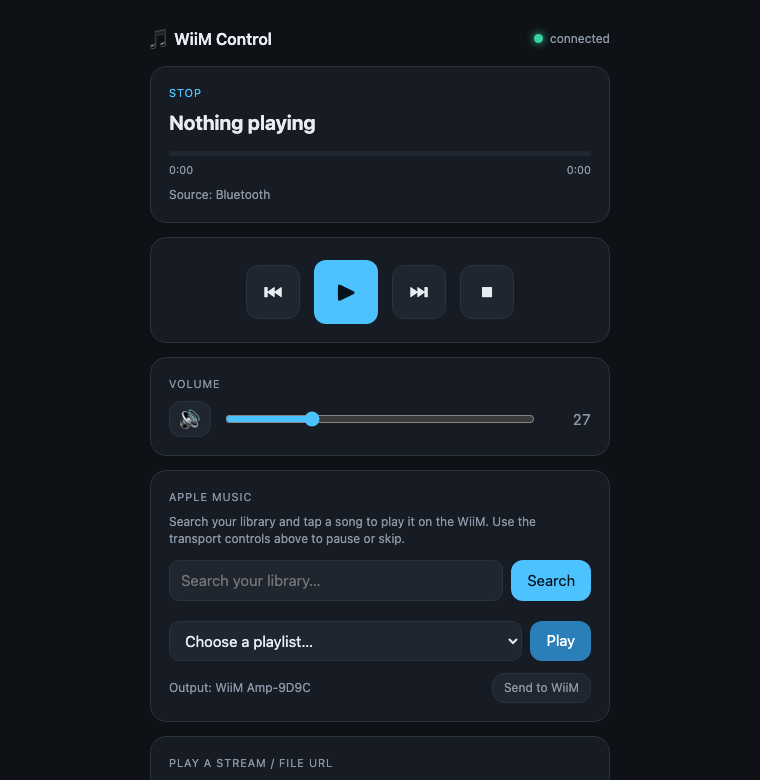
A dark little page at 127.0.0.1:8765: now-playing with a progress bar,
four transport buttons that control whatever’s playing, the one volume
slider, a box for pasting a stream URL, and Apple Music library search with a
“Send to WiiM” routing button. It runs on a Mac that’s usually awake anyway,
and it has quietly replaced all three of the original control surfaces.
Code’s on GitHub at tristanreid/wiim-control — one Python file, one HTML file, one AppleScript helper. If you have any LinkPlay-based device (WiiM Mini/Pro/Amp, and a surprising number of other brands), the HTTP half should work as-is; the Apple Music half wants a Mac.
On the ideas shelf: push-to-talk voice control,
and having the Mac speak the now-playing status aloud via say — because if
you’ve already got a music system you can curl, why wouldn’t you?