Building an Interactive Trie Visualizer with D3
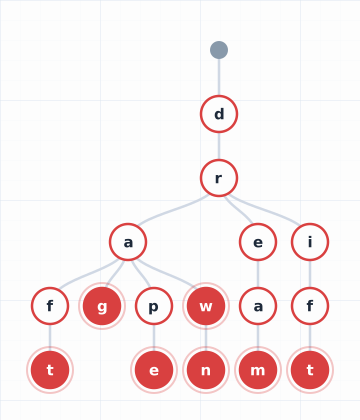
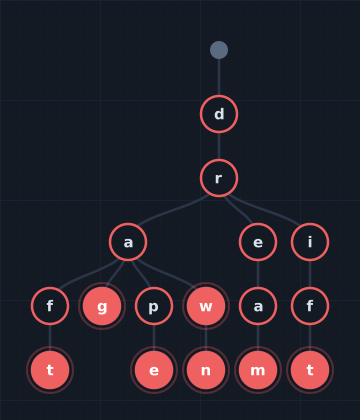
In Part 1, we explored the trie data structure and built one in Python. But the best part of that post was the interactive explorer — type words, watch the tree grow:
This post is the story of how that component works. If you’ve ever wanted to take a data structure out of the abstract and make it something people can see and touch, this is the recipe: a TypeScript data model, D3 for layout and rendering, and a handful of techniques that make it feel alive.
The Architecture
The visualizer is built from three layers, each with a single job:
trie-engine.ts— The data structure. A TypeScript trie that stores words and exports its shape as a tree suitable for D3.trie-viz.ts— The renderer. A D3 class that takes a tree shape and draws an animated SVG.trie-explorer.ts— The interactive shell. The input field, buttons, example presets, and stats display.
This separation matters. The engine knows nothing about rendering. The renderer knows nothing about user interaction. You could swap the explorer for a command-line tool, or swap the renderer for a Canvas-based one, and the other layers wouldn’t change.
Step 1: Making the Trie D3-Compatible
D3’s tree layout expects a specific shape: a root object with a children array, recursively. Each node needs a stable identity so D3 can track it across updates.
The trie engine exports this via toHierarchy():
interface TrieHierarchyNode {
  id: string;            // The prefix path (e.g. "ca" for the node after c→a)
  char: string;          // Character at this node
  path: string;          // Full prefix from root
  isTerminal: boolean;   // Does a word end here?
  words: string[];       // Which words end here
  children: TrieHierarchyNode[];
}
The id field is the key insight. Each node’s identity is its path from root — the accumulated prefix. The node for “c” has id: "c". The node for “ca” has id: "ca". The root has id: "__root__". These IDs are stable: adding the word “cart” doesn’t change the identity of the “c” or “ca” nodes, it just adds new children beneath them.
This stability is what makes smooth animations possible. When D3 sees an update, it can tell: “the node ca already exists — just move it. The node car is new — fade it in.”
Step 2: D3’s Tree Layout
D3 has a built-in tree layout algorithm that takes a hierarchy and assigns (x, y) coordinates to each node. It handles all the tricky spacing — ensuring siblings don’t overlap, subtrees don’t collide, and the tree is centered.
const root = d3.hierarchy(data);
const treeLayout = d3.tree().nodeSize([56, 72]);
treeLayout(root);
The nodeSize([56, 72]) call says: “give each node a 56×72 pixel cell.” D3 uses this to compute horizontal separation (56px between siblings) and vertical separation (72px between parent and child). After calling the layout, every node in the hierarchy has .x and .y coordinates.
One subtlety: nodeSize positions the root at (0, 0), with children extending downward (positive y) and siblings spreading left and right (positive and negative x). The tree isn’t centered in any container — it lives in its own coordinate space. We need to compute the actual bounds and set the SVG’s viewBox to frame it:
let xMin = 0, xMax = 0, yMax = 0;
root.each(d => {
  xMin = Math.min(xMin, d.x);
  xMax = Math.max(xMax, d.x);
  yMax = Math.max(yMax, d.y);
});

const pad = 56; // room for node radius + margin
svg.attr('viewBox',
  `${xMin - pad} ${-pad} ${xMax - xMin + 2 * pad} ${yMax + 2 * pad}`
);
The viewBox with preserveAspectRatio="xMidYMin meet" makes the SVG scale to fit its container while maintaining proportions. A trie for three-letter words and a trie for twenty entries both render at the right size automatically.
Step 3: The Enter/Update/Exit Pattern
This is the heart of D3, and the reason the visualization animates smoothly. When you add a word to the trie, some SVG elements need to be created (new nodes), some need to be moved (existing nodes shifting to make room), and some might need to be removed (when you clear the trie).
D3 handles this with a data join:
const nodeSel = nodeGroup
  .selectAll('.trie-viz-node')
  .data(nodes, d => d.data.id);  // key function!
The key function d => d.data.id tells D3 how to match data to DOM elements. A node with id: "ca" in the old data matches the DOM element that was previously bound to id: "ca" in the new data. This gives us three selections:
- Enter: new data points with no matching DOM element → create new SVG groups
- Update: data points that match existing DOM elements → move them to new positions
- Exit: DOM elements with no matching data point → fade out and remove
For entering nodes, we create a group with a circle and a text label, starting at opacity 0:
const enterG = nodeSel.enter()
  .append('g')
  .attr('transform', d => `translate(${d.x},${d.y})`)
  .attr('opacity', 0);

enterG.append('circle')
  .attr('r', 20)
  .attr('fill', d => d.data.isTerminal ? accent : bg)
  .attr('stroke', accent);

enterG.append('text')
  .attr('text-anchor', 'middle')
  .attr('dy', '0.35em')
  .text(d => d.data.char);
Then we merge the enter and update selections and animate everything together:
nodeSel.merge(enterG)
  .transition()
  .duration(400)
  .attr('opacity', 1)
  .attr('transform', d => `translate(${d.x},${d.y})`);
New nodes fade in to opacity 1. Existing nodes slide to their new positions. The merge is critical — it ensures both groups are animated in a single transition.
The Transition Trap
There’s a subtle D3 gotcha here that cost me an hour of debugging. D3 transitions are named, and unnamed transitions on the same element cancel each other. If you write:
enterG.transition().duration(400).attr('opacity', 1);      // transition A
merged.transition().duration(400).attr('transform', ...);   // transition B
Transition B replaces transition A on the enter elements, because both are unnamed and scheduled on the same elements. The opacity never transitions — the nodes stay invisible.
The fix is to use a single merged transition that handles both properties:
merged.transition().duration(400)
  .attr('opacity', 1)
  .attr('transform', d => `translate(${d.x},${d.y})`);
Or use named transitions: .transition("fade") and .transition("move"). Named transitions coexist peacefully on the same element.
Step 4: Links as Curved Paths
The edges connecting nodes use D3’s linkVertical generator, which creates smooth Bézier curves:
const linkPath = d3.linkVertical()
  .x(d => d.x)
  .y(d => d.y);
This generates an SVG <path> that curves gently from parent to child. The links use the same enter/update/exit pattern as nodes — new links fade in, existing links smoothly reshape as the tree changes, and removed links fade out.
One important detail: links are rendered in a group behind the nodes. The SVG is structured as:
<g class="trie-viz-content">
  <g class="trie-viz-links">...</g>   <!-- drawn first = behind -->
  <g class="trie-viz-nodes">...</g>   <!-- drawn second = in front -->
</g>
SVG doesn’t have a z-index — elements are painted in document order. By putting links in an earlier group, they’re always behind the node circles.
Step 5: Three Node Types
The visualization distinguishes three kinds of nodes, each styled differently:
- Root: a small gray dot (radius 10). No character label — it represents the “start” state before any characters are consumed.
- Internal: white circle with an accent-colored border, dark character label. These are waypoints — characters along a path, but no word ends here.
- Terminal: accent-filled circle with white character label, plus a subtle outer ring. A word ends at this node.
The styling is applied via both CSS classes (for the static stylesheet) and inline D3 attributes (for reliable SVG rendering):
enterG.append('circle')
  .attr('fill', d => {
    if (d.data.id === '__root__') return textMuted;
    return d.data.isTerminal ? accent : bg;
  })
  .attr('stroke', d => {
    if (d.data.id === '__root__') return textMuted;
    return accent;
  });
When a new word turns an internal node into a terminal (e.g., adding “car” to a trie that already has “card”), the node’s fill transitions smoothly from white to the accent color. The update transition handles this automatically because it re-evaluates the fill function on every update.
Step 6: Reading the Theme
The blog has seven visual themes, each defined as a set of CSS custom properties. The graph theme uses a red accent on white; the stochastic theme uses teal on dark blue. The trie visualizer adapts to any of them.
The trick: at mount time, read the computed CSS custom properties from document.documentElement and store them:
const cs = getComputedStyle(document.documentElement);
this.colors = {
  accent: cs.getPropertyValue('--accent').trim() || '#d94040',
  bg:     cs.getPropertyValue('--bg').trim()     || '#ffffff',
  text:   cs.getPropertyValue('--text').trim()    || '#1e2a3a',
  border: cs.getPropertyValue('--border').trim()  || '#d0d8e4',
};
These colors are then used in the inline D3 attributes. Why not rely purely on CSS classes? Because SVG fill and stroke set via CSS custom properties can be unreliable across browsers and rendering contexts. Reading the resolved values once and applying them as inline attributes guarantees that the circles and text are always visible, regardless of theme.
The Component Shell
The trie-explorer component wraps the engine and renderer with a user interface:
- Input field with Enter-to-submit and an Add button
- Preset examples (“Cars & Cards”, “TH- words”, etc.) that load word sets with staggered animation
- Stats bar showing word count, node count, total characters, and prefix savings
- Reset button that clears everything
The animated example loading is a nice UX touch — words are added one at a time with 500ms delays, so you can watch the trie grow step by step:
async function loadExample(words: string[]) {
  trie.clear();
  for (const word of words) {
    await sleep(500);
    trie.insert(word);
    viz.update(trie.toHierarchy());
    updateStats();
  }
}
This turns a static word list into a mini-animation that teaches the trie’s structure through motion.
What This Enables
Having a reusable trie visualizer opens up some interesting possibilities:
- Static SVG generation: The same renderer can produce SVGs without user interaction, suitable for blog illustrations or documentation.
- A “trie” theme: Imagine a site theme where the background features scattered trie diagrams at varying sizes and opacities — similar to how the
taxicabtheme scatters SVG taxicabs and thestochastictheme scatters bell curves. The word sets could be programming terms, data structure names, or random English words. - Other data structures: The same architecture (engine → hierarchy export → D3 tree layout → animated SVG) works for any tree-shaped data structure. Binary search trees, heaps, parse trees — they all fit the same pattern.
The Full Stack
To recap, visualizing a data structure interactively involves:
- A data model that owns the structure and can export it as a tree hierarchy
- A stable identity scheme (the path-based
id) so D3 can track elements across updates - D3’s tree layout to compute positions automatically
- The enter/update/exit pattern to animate changes — with a single merged transition to avoid cancellation
- Link and node groups in the right SVG order for proper layering
- Theme-aware colors read from CSS custom properties at mount time
- An interactive shell that connects user input to the data model and triggers re-renders
The result: type “the, there, their” and watch shared prefixes merge into a single path, terminal nodes light up, and the stats count your savings. Data structures don’t have to be abstract.
The Series So Far
- What Is a Trie? — The data structure, from intuition to implementation
- Building an Interactive Trie Visualizer with D3 — You are here
- Scanning Text with a Trie — Multi-pattern matching, word boundaries, overlap resolution
- Broadcasting a Trie in Spark — The distributed computation pattern
- Building a Trie-Powered Autocomplete with React — The React component
- Shrinking the Trie for the Wire — Can a custom format beat gzip? We measured.
Previous: What Is a Trie?